Authentication - HMAC (test)
This authentication method is ONLY for the Online Payment Page product.
Payment API, EAM and Payment Request use CSR/JWT-based authentication → CSR/JWT authentication
What is HMAC?
HMAC (Hash-based Message Authentication Code) is a message authentication code that ensures the request genuinely comes from the partner and has not been modified in transit.
The following are required for Online Payment Page API calls:
- API key - in the HTTP header (
x-api-key) - HMAC secret - for signing the payload
- Technical User ID - in the payload (
technicalUserId)
Extracting Credentials from the RPP Portal
The required credentials can be extracted from the Raiffeisen Pay Portal after creating the API user and setting permissions.
Steps:
- Follow the Raiffeisen Pay Portal setup
- Set EAM and RTP permissions
- Credentials appear on the RPP interface
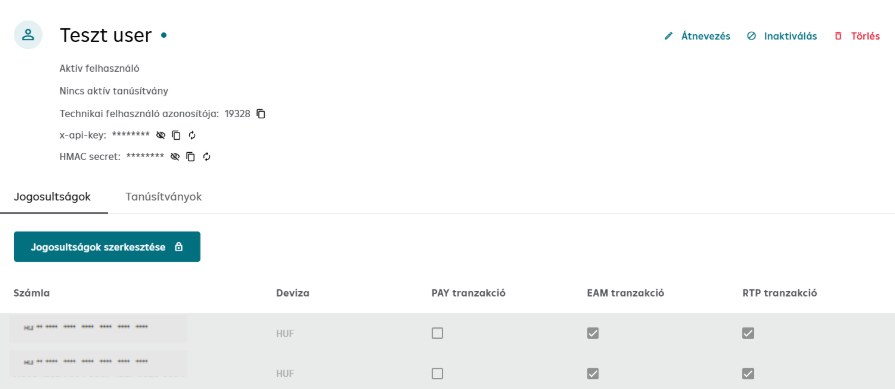
Required data:
- API key (x-api-key) - to be used in HTTP header
- HMAC secret - in HEX format, for signing the payload
- Technical User ID - in payload field
The HMAC secret is in HEX format. Some HMAC libraries do not expect this parameter in HEX format by default – pay attention to this during implementation.
Composing the API Call
HTTP Headers
POST /v1/ofo/start
Host: premium-api-int.raiffeisen.hu
Content-Type: application/json
x-api-key: <API_KEY_FROM_RPP>
Signature: <GENERATED_HMAC_SIGNATURE>
x-correlation-id: <UUID>
x-request-id: <UUID>
Header explanation:
Content-Type- Alwaysapplication/jsonx-api-key- API key extracted from RPP portalSignature- The generated HMAC signaturex-correlation-id- UUID (request identifier)x-request-id- UUID (technical identifier)
Request Body
The request body is the minified JSON payload.
{"idempotencyKey":"f4e5b92d-60ff-46bd-a26a-8342116cdec5","technicalUserId":"10234","language":"HU","url":"https://demo-webshop.hu","transactionReference":"1Ffnhelta3b","paymentMethods":["EAM"],"transactionCurrency":"HUF","transactionAmount":250,"remittanceInfo":"Test purchase","shopId":"shop0001","terminalReference":"terminal0001","timestamp":"2024-10-04T14:23:45Z"}
Troubleshooting
Common errors
| Error | Cause | Solution |
|---|---|---|
| 401 Unauthorized | Wrong API key | Check API key on RPP portal |
| 401 Unauthorized | Wrong HMAC signature | Check HMAC generation and HEX decode |
| 403 Forbidden | Timestamp too old (>5 min) | Synchronize clock (NTP) |
| Invalid signature | Wrong HMAC secret | Check that you are using the correct secret |
Next Step
Now that HMAC authentication is set up, you can make your first API call.
Detailed Online Payment Page documentation: Online Payment Page →