Error Path 2: Failed Payment Initiation in the Payer's Mobile Banking Application
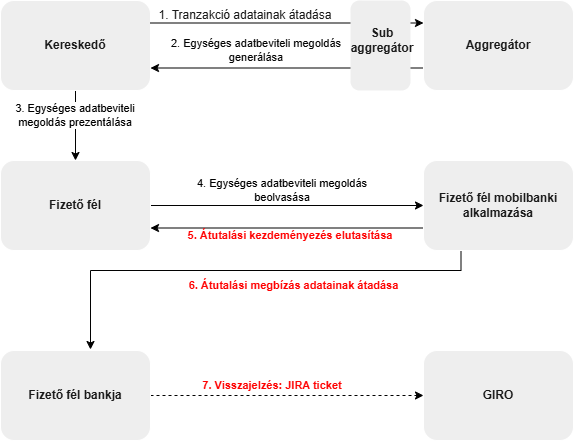
Process steps:
- The merchant's system transmits the current purchase data to the Aggregator via an electronic channel. A sub-aggregator may also be involved in the initiation and feedback process.
- The Aggregator creates the EAM according to the standard defined in the regulation, containing transaction and beneficiary data with an authentication code.
- The merchant displays the EAM on their POS system. For invoiced payments, the QR code is printed. For webshop purchases, a deeplink is generated. For NFC, the merchant's device broadcasts the data.
- The payer scans the EAM with their multi-function device. The payer's bank is unable to send a feedback message to the merchant via GIRO if the mobile application found a deficiency during formal verification of the EAM – for example, if a mandatory field is missing or the beneficiary account number is invalid. In such cases, individual investigation is required. This also logically includes the case of an expired EAM, where generating a feedback message is not permitted to protect system performance.
- The mobile banking application notifies the payer about the failed initiation.