Authentication - HMAC (Production)
This is the HMAC setup for the production environment. Every transaction results in real money movement!
This authentication method is ONLY for the Online Payment Page product.
Payment API, Balance API, EAM and Payment Request use CSR/JWT-based authentication → CSR/JWT authentication (production)
What is HMAC?
HMAC (Hash-based Message Authentication Code) is a message authentication code that ensures the request genuinely comes from the partner and has not been modified in transit.
The following are required for Online Payment Page API calls:
- API key - in the HTTP header (
x-api-key) - HMAC secret - for signing the payload
- Technical User ID - in the payload (
technicalUserId)
Extracting Credentials from the RPP Portal
The required credentials can be extracted from the production Raiffeisen Pay Portal after creating the API user and setting permissions.
Steps:
- Follow the Raiffeisen Pay Portal setup (production)
- Set EAM and RTP permissions
- Credentials appear on the RPP interface
Data to extract:
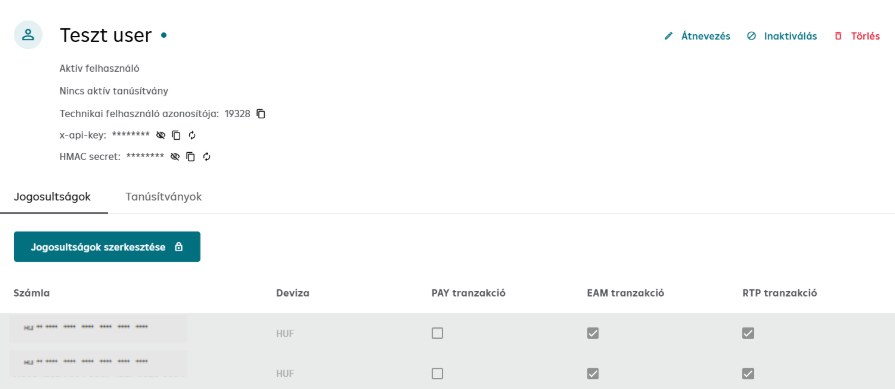
- API key (x-api-key) - to be used in HTTP header
- HMAC secret - in HEX format, for signing the payload
- Technical User ID - in payload field
The HMAC secret is in HEX format. Some HMAC libraries do not expect this parameter in HEX format by default – pay attention to this during implementation.
NEVER commit the API key or HMAC secret to a git repository! Use a secrets manager.
Composing the API Call
HTTP Headers
POST /v1/ofo/start
Host: premium-api.raiffeisen.hu
Content-Type: application/json
x-api-key: <API_KEY_FROM_RPP>
Signature: <GENERATED_HMAC_SIGNATURE>
x-correlation-id: <UUID>
x-request-id: <UUID>
The production environment URL is: https://premium-api.raiffeisen.hu (NO -pc suffix!)
Header explanation:
Content-Type- Alwaysapplication/jsonx-api-key- API key extracted from RPP portalSignature- The generated HMAC signaturex-correlation-id- UUID (request identifier, for logging)x-request-id- UUID (technical identifier)
Request Body
The request body is the minified JSON payload.
{"idempotencyKey":"f4e5b92d-60ff-46bd-a26a-8342116cdec5","technicalUserId":"10234","language":"HU","url":"https://your-webshop.hu","transactionReference":"1Ffnhelta3b","paymentMethods":["EAM"],"transactionCurrency":"HUF","transactionAmount":250,"remittanceInfo":"Purchase","shopId":"shop0001","terminalReference":"terminal0001","timestamp":"2026-01-20T14:23:45Z"}
Never upload the following values to public locations:
- API key (
x-api-key) - HMAC secret
- HMAC signature (not even partially)
- Full request body (if it contains sensitive data)
Instead provide: x-correlation-id, x-request-id, response status code, error message
Troubleshooting
Common errors
| Error | Cause | Solution |
|---|---|---|
| 401 Unauthorized | Wrong API key | Check API key on RPP portal |
| 401 Unauthorized | Wrong HMAC signature | Check HMAC generation and HEX decode |
| 403 Forbidden | Timestamp too old (>5 min) | Synchronize clock (NTP) |
| Invalid signature | Wrong HMAC secret | Check that you are using the correct secret |
Next Step
Now that HMAC authentication is set up, you can make your first production API call.
Detailed Online Payment Page documentation: Online Payment Page →